Samedoc / Translate a scanned PDF
Translate a scanned PDF. Get the same page back.
Upload a scan or a phone photo of a letter, certificate or statement. Samedoc reads the page, translates it and puts the new text where the original was. Logos, stamps, tables and every number stay in place.
Updated November 6, 2026
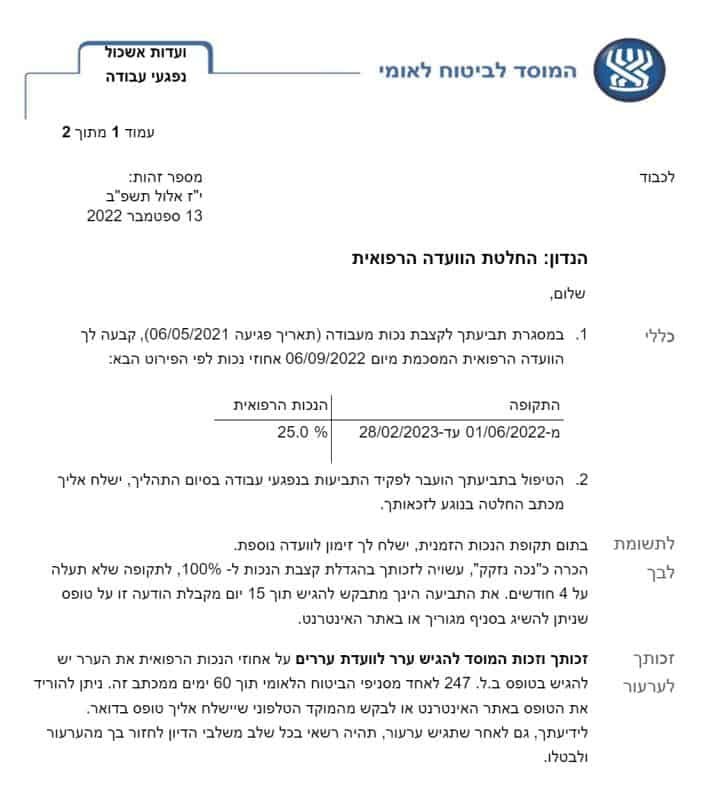 Original scan (Hebrew)
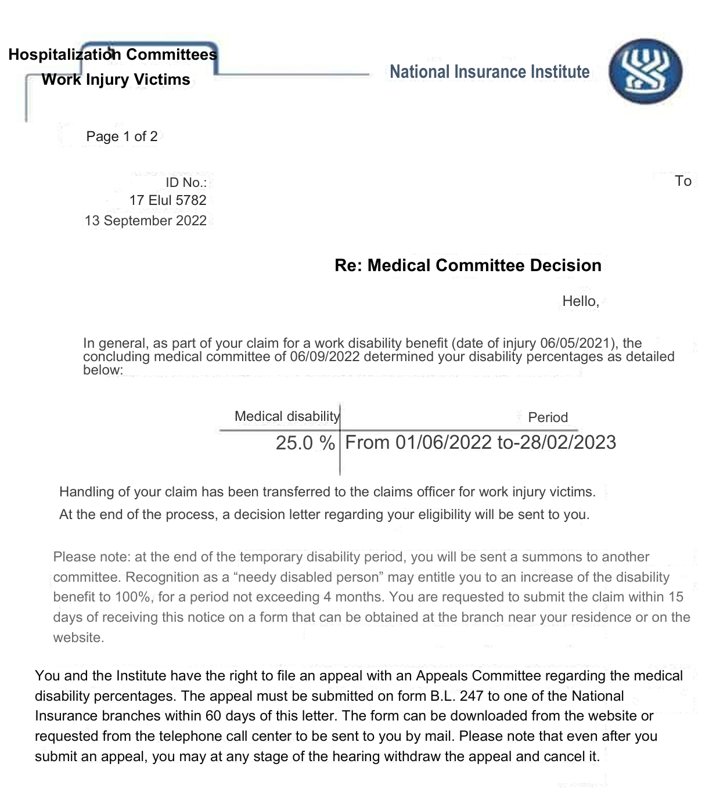 Samedoc (English)
Why most tools can't translate a scan
A scanned PDF is a picture of a page, not text. Translators that read a PDF's text layer find nothing to translate. Google Translate's help page says it plainly: text in images and scanned PDF pages shows up in the output document, but it isn't translated. When Google detects a scan, it stops with "Can't translate scanned PDFs".
Copying the text out with OCR and pasting it into a translator works, but you get plain text back. You rebuild the page, retype the tables and check every number by hand. Samedoc works on the page itself: it reads the scan, erases the original words on the paper's own colour, and sets the translation in the same place.

Google Translate on an Israeli payslip in our test, November 2026. The file was a normal digital PDF, not a scan.
Ways to translate a scanned document
| Method | Works on scans | Keeps the layout | What's left for you |
|---|---|---|---|
| Google Translate, Documents tab | No: text in scans isn't translated | Yes, on digital files | Find another way for scans |
| OCR, then paste into a translator | Yes | No, plain text | Rebuild the page, retype tables, check numbers |
| ChatGPT or another AI chat | Yes, it reads the image | No, text in the chat | Rebuild the page from the text |
| A professional translator | Yes | Yes | Pay about $25 to $35 a page and wait |
| Samedoc | Yes | Yes, the same page | Check the result; numbers are checked for you |
Google's behaviour from Google Translate Help, checked November 6, 2026.
How to translate a scan in about a minute
- Upload the originalA PDF, a scan or a phone photo (PDF, PNG, JPG or WEBP, up to 25 MB).
- Pick the languageHebrew, Arabic and other right-to-left pages included. You can switch the layout to left-to-right.
- Download the same documentA PDF in the original layout, with a quality report. Need to edit it? Turn it into Word with PDF to Word.
Get a better result from your scan
- The whole page, flat. Lay it on a table, keep all four corners in the frame, and don't crop the stamp or the footer.
- Even light, no shadow. Daylight from a window works better than a flash.
- One page per photo. A multi-page document? Scan it into one PDF, or upload the pages one by one.
- Scanner? 300 dpi in colour or greyscale is plenty. Higher only makes the file bigger.
Questions
Can Google Translate translate a scanned PDF?
No. Google Translate's help page says text in images and scanned PDF pages appears in the output document but isn't translated, and the Documents tab shows "Can't translate scanned PDFs". Use a tool that reads the page image, like Samedoc.
Can I translate a photo of a document?
Yes. Upload a PNG, JPG or WEBP photo. Keep the page flat, well lit and fully in the frame.
Is it free?
The free plan includes 1 document a day, up to 3 pages. For longer documents or a packet of up to 200, see bulk document translation.
What happens to stamps, signatures and logos?
They stay on the page as they are. Samedoc's quality checks flag a page where new text lands on a logo or stamp, so you know where to look.
Can I edit the translated scan?
Yes. Download the translated PDF, then turn it into an editable Word file with PDF to Word.
What happens to my file?
It is used only to make your translation and is deleted after 24 hours. See the privacy policy.
Translate your scan now
1 free document a day. You get the same page back, translated.