Samedoc / Hebrew PDF to English
Translate a Hebrew PDF to English. Same layout.
Payslips (תלוש שכר), bank statements, Bituach Leumi letters and certificates, translated into English in the original layout. Numbers, dates and ID numbers are copied from your file and checked.
Updated November 6, 2026
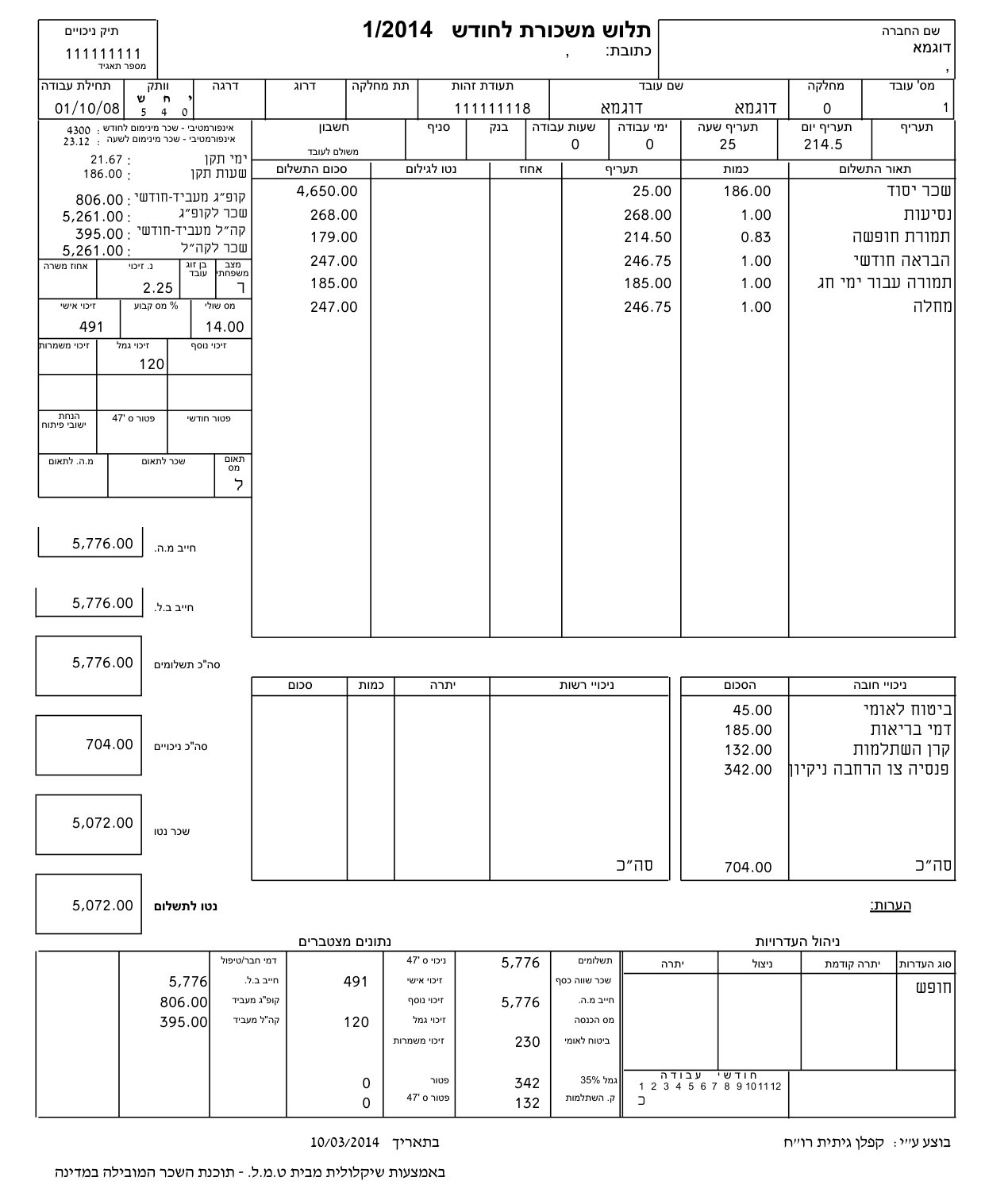 Original (Hebrew)
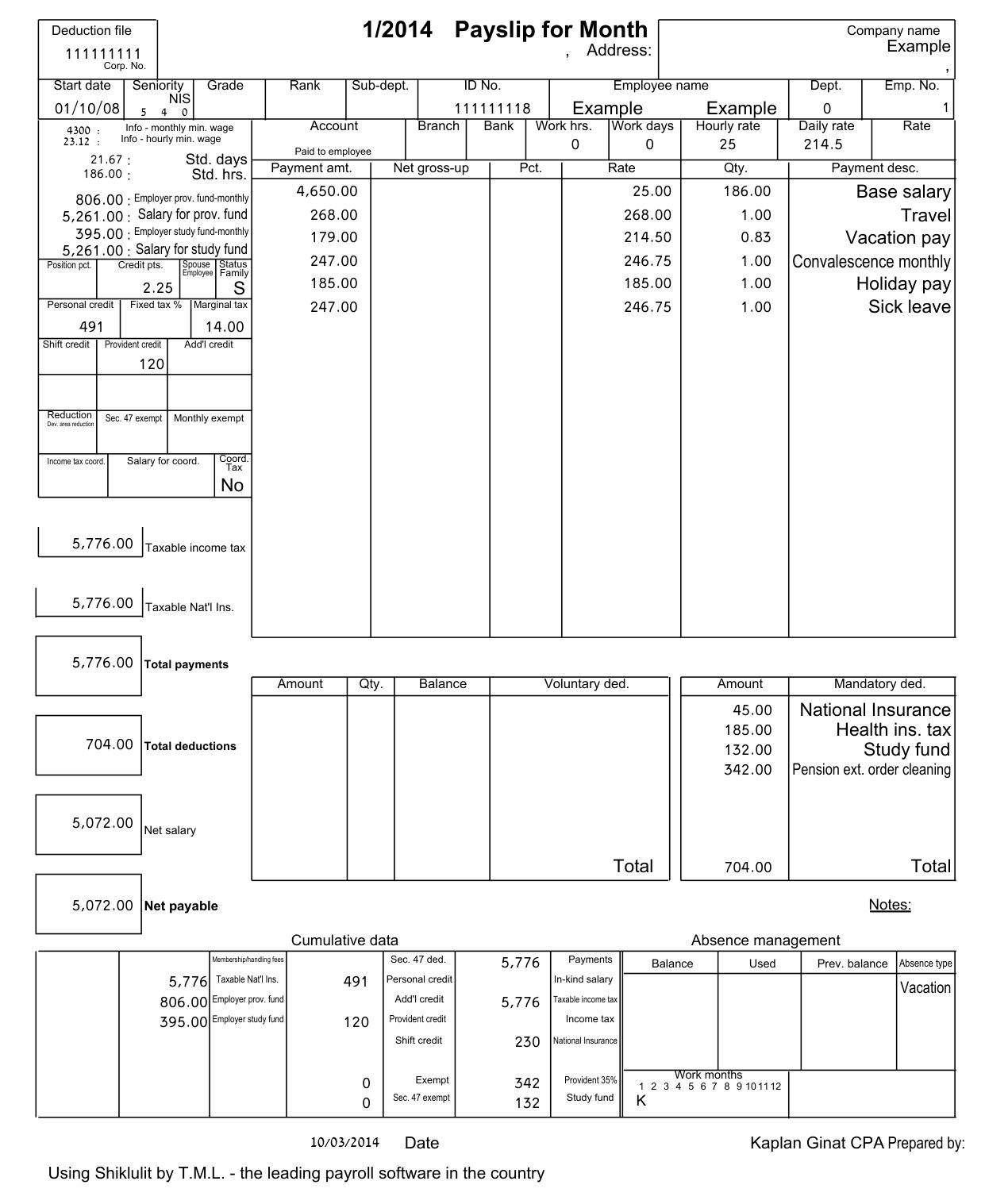 Samedoc (English)
Why Hebrew PDFs break most translators
Two things: right-to-left layout, and broken text. A Hebrew page reads right to left, so a translator that keeps every word in place can leave English in a mirrored layout, or reverse it. And Israeli payroll and bank software often embeds fonts whose characters are stored in a broken way. In the payslip above, only 678 of 1,710 characters come out as Hebrew; the rest are symbols like ∑≈›. Tools that read the text layer translate the symbols.
Samedoc reads the page the way you see it, so broken text doesn't matter, and it can switch the layout to left-to-right so the English reads naturally.
Five translators, one Hebrew payslip
| Tool | Result (November 2026) |
|---|---|
| Google Translate | Refused: "Can't translate scanned PDFs" (it wasn't a scan) |
| onlinedoctranslator.com | Layout kept, but every line came out as garbled symbols |
| iLovePDF Translate PDF | Box labels translated; payment lines, deductions and the name stayed as symbols |
| DeepL (free account) | Labels translated, but every line mirrored and some numbers mangled |
| Samedoc | Every line translated in the same layout, 0 numbers changed |
Same file in every tool. See also why Google Translate refuses some PDFs and DeepL's limits.
Hebrew documents Samedoc is built for
- Payslip (תלוש שכר): gross, deductions and net pay, line by line.
- Bank statement: every balance and transaction amount, with dates.
- Form 106: the annual salary and tax summary from your employer.
- Israeli ID card, birth certificate and marriage certificate.
- All Israeli documents, with what to check in each translation.
Need to edit the Hebrew document itself? PDF to Word turns it into an editable Word file with the right-to-left text in place.
Translate your Hebrew PDF
- Upload the originalA PDF, a scan or a phone photo (PDF, PNG, JPG or WEBP, up to 25 MB).
- Pick the languageHebrew, Arabic and other right-to-left pages included. You can switch the layout to left-to-right.
- Download the same documentA PDF in the original layout, with a quality report. Need to edit it? Turn it into Word with PDF to Word.
Questions
Does it work on scanned Hebrew letters?
Yes. Scans and phone photos of letters from Bituach Leumi, the tax authority, banks and employers. See translating a scanned PDF.
Will the English read left to right?
Yes, if you want it to. Switch on the left-to-right layout and Samedoc flips the page so the English reads naturally. Leave it off to keep the original right-to-left layout.
Is the translation certified for aliyah, a visa or a court?
No. Samedoc translations are made with AI. Give the Samedoc copy to a qualified translator to review and sign; it saves them most of the work. A professional manual review is available at extra cost.
Is it free?
The free plan includes 1 document a day, up to 3 pages. For longer documents or a packet of up to 200, see bulk document translation.
What happens to my file?
It is used only to make your translation and is deleted after 24 hours. See the privacy policy.
Translate your Hebrew document now
1 free document a day. The same page, in English.